System Architecture
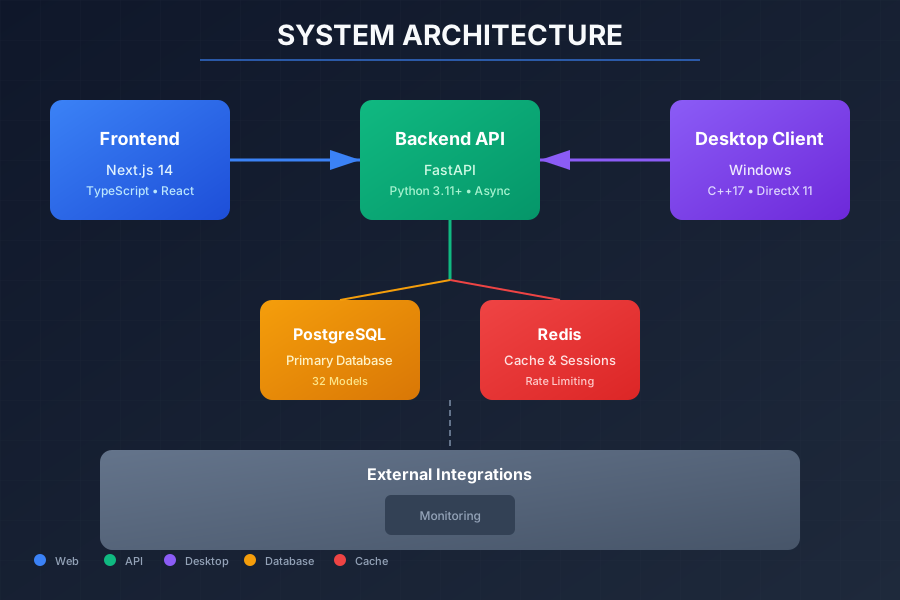
The platform consists of four major components working together to provide secure software licensing and distribution.
How It All Works Together
Through the Next.js web dashboard, administrators generate license keys with customizable expiration dates and activation limits.
End users receive their license key and download the C++ Windows client application.
The desktop client sends credentials along with a hardware ID (HWID) to the FastAPI backend, which registers and binds the device.
The client downloads AES-256-GCM encrypted files, decrypts them in memory using HKDF-derived keys, and validates the license periodically via heartbeats.
All actions are logged to PostgreSQL, cached in Redis, and admins can monitor everything in real-time through the dashboard.
Components
Backend API
Tech Stack
Key Features
- Dual authentication: Web sessions + JWT tokens
- Multi-device support with configurable limits
- Hardware ID (HWID) binding for license protection
- Encrypted file storage (AES-256-GCM)
- Redis-based rate limiting (token bucket algorithm)
- Comprehensive audit logging with geolocation
Metrics
Admin Dashboard & User Portal
Tech Stack
Key Features
- Real-time statistics dashboard
- User management with ban/unban controls
- License generation and activation tracking
- Multi-device tracking per user
- JWT token refresh (proactive)
- Mobile-responsive dark/light theme
Metrics
Windows Desktop Client
Tech Stack
Key Features
- JWT-based authentication with backend API
- In-memory file decryption (no plaintext on disk)
- HWID-based device binding
- Secure credential storage via Windows Credential Manager
- Automatic token refresh
- Modern dark-themed ImGui interface
Metrics
Client Module
Tech Stack
Key Features
- Encrypted authentication via shared memory
- Heartbeat validation (periodic license checks)
- Lua scripting for extensibility
- Crash recovery with graceful degradation
Metrics
Authentication Flows
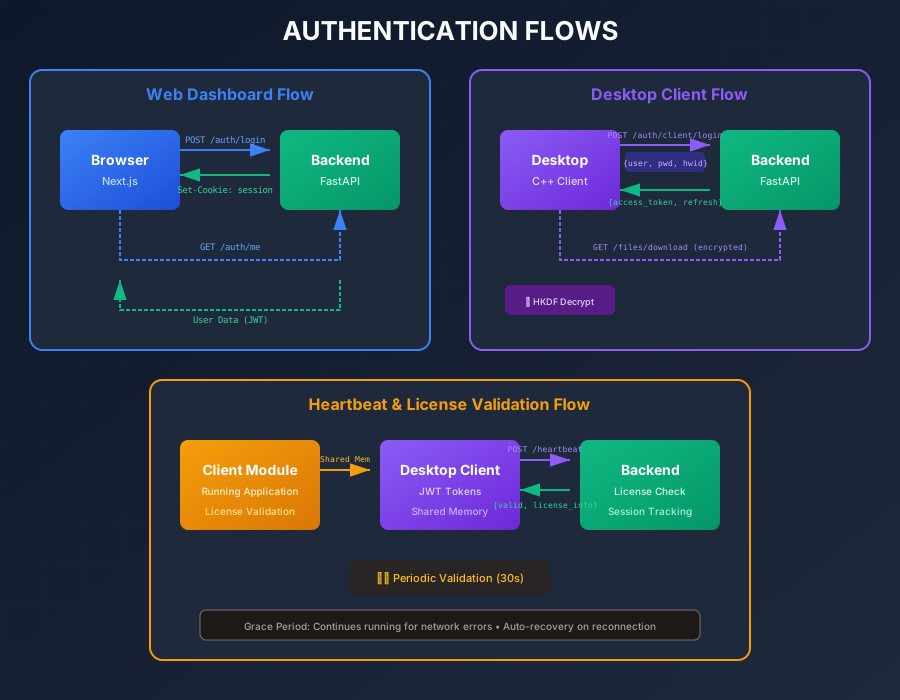
Dual authentication system supporting both web dashboard sessions and desktop client JWT tokens.
Web Dashboard (Session-based)
Browser → POST /auth/login → Set HTTP-only cookie → Done - HTTP-only cookies prevent XSS token theft
- Session stored in Redis for fast validation
- Automatic CSRF protection
Desktop Client (JWT-based)
Client → POST /auth/client/login (with HWID) → JWT tokens - Short-lived access tokens (15 minutes)
- Long-lived refresh tokens (7 days)
- Hardware ID binding for device verification
- Proactive token refresh before expiry
File Encryption Flow
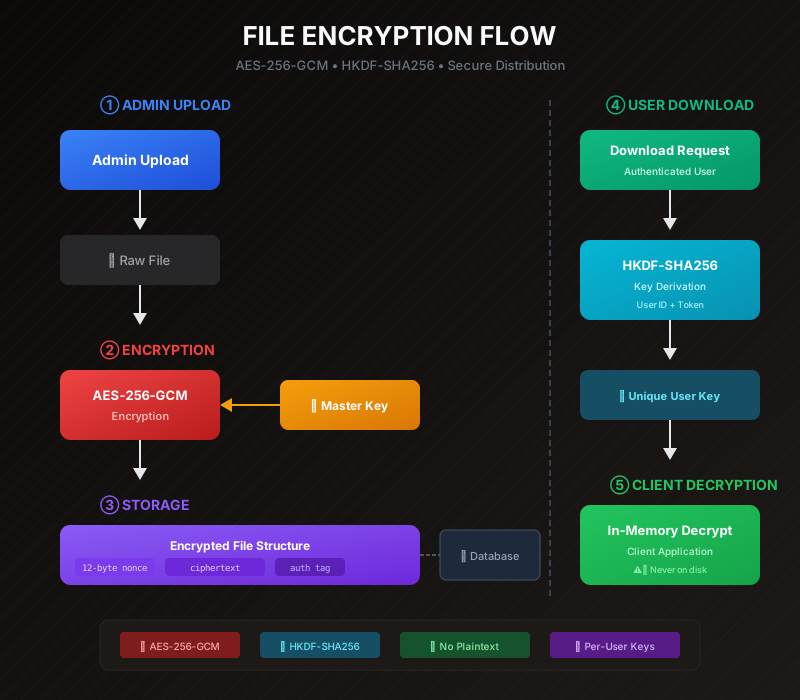
Secure file delivery with AES-256-GCM encryption and per-user HKDF-derived keys.
Server-Side Encryption
Files are encrypted with AES-256-GCM using a master key. The encrypted format includes a 12-byte nonce, variable-length ciphertext, and 16-byte authentication tag.
HKDF Key Derivation
When a user requests a download, a unique decryption key is derived using HKDF-SHA256 with the user's ID and access token. Keys are derived, not stored—reducing attack surface.
In-Memory Decryption
The desktop client decrypts files entirely in memory. Plaintext never touches the disk, ensuring stolen encrypted files are useless without valid credentials.
Security Architecture
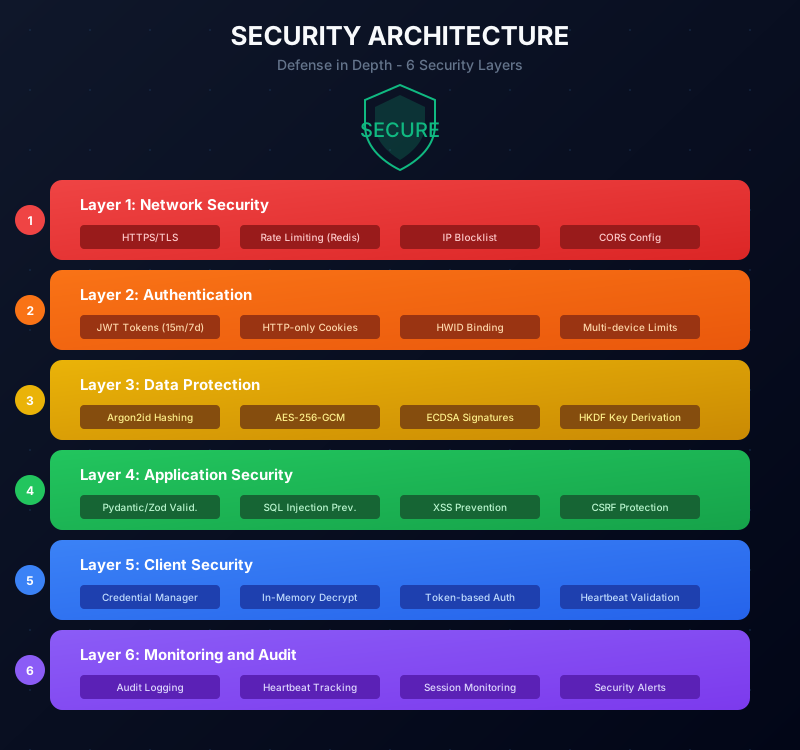
Defense in depth approach with multiple security layers protecting the platform.
Network Security
- HTTPS/TLS for all communications
- Rate limiting (Redis token bucket)
- IP blocklist middleware
- CORS configuration
Authentication
- JWT tokens (15 min access, 7 day refresh)
- HTTP-only session cookies
- HWID binding
- Multi-device limits
Data Protection
- Argon2id password hashing
- AES-256-GCM file encryption
- ECDSA signature verification
- HKDF key derivation
Application Security
- Input validation (Pydantic/Zod)
- SQL injection prevention
- XSS prevention (React)
- CSRF protection
Deployment Architecture
Containerized deployment using Docker Compose for easy scaling and management.
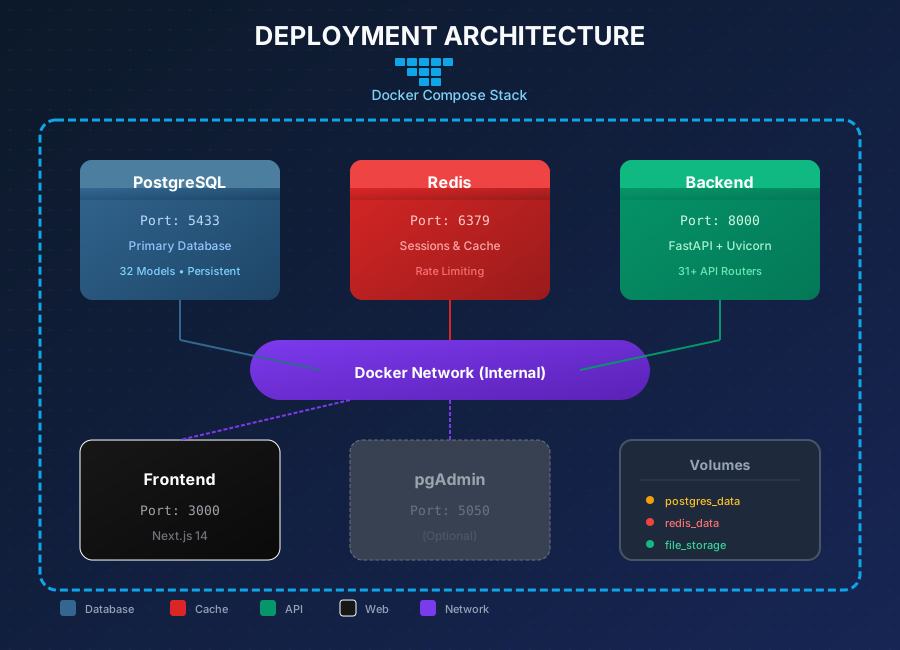
PostgreSQL
Port 5433Primary database with persistent volume for data durability. Stores users, licenses, sessions, and audit logs.
Redis
Port 6379In-memory cache for session storage, rate limiting counters, and frequently accessed data.
FastAPI Backend
Port 8000Async Python API server running on Uvicorn with auto-reload in development mode.
Next.js Frontend
Port 3000React-based dashboard with server-side rendering for optimal performance.
Code Statistics
Technical Deep Dive
Key implementation details showcasing the security and architecture decisions.
Dual Authentication System
pythonSupporting both web sessions and desktop JWT tokens with hardware binding
@router.post("/client/login")
async def client_login(
    credentials: ClientLoginRequest,
    db: AsyncSession = Depends(get_db)
):
    # Validate credentials
    user = await authenticate_user(db, credentials.username, credentials.password)

    # Check/register device
    device = await device_service.get_or_create_device(
        db, user.id, credentials.hwid
    )

    # Check device limits
    if device.is_new and user.device_count >= user.max_devices:
        raise HTTPException(400, "Device limit reached")

    # Generate tokens
    access_token = create_access_token(user.id, device.id)
    refresh_token = create_refresh_token(user.id, device.id)

    return {
        "access_token": access_token,
        "refresh_token": refresh_token,
        "device_id": device.id
    }
AES-256-GCM File Encryption
pythonServer-side file encryption with authenticated encryption
def encrypt_file(plaintext: bytes, key: bytes) -> bytes:
    nonce = os.urandom(12)  # 96-bit nonce
    cipher = Cipher(algorithms.AES(key), modes.GCM(nonce))
    encryptor = cipher.encryptor()
    ciphertext = encryptor.update(plaintext) + encryptor.finalize()

    # Format: nonce (12) + ciphertext (variable) + tag (16)
    return nonce + ciphertext + encryptor.tag

def derive_user_key(user_id: str, access_token: str) -> bytes:
    hkdf = HKDF(
        algorithm=hashes.SHA256(),
        length=32,
        salt=user_id.encode(),
        info=b"file_decryption_key"
    )
    return hkdf.derive(access_token.encode())
In-Memory Decryption (C++)
cppFiles decrypted entirely in memory - plaintext never touches disk
std::vector<uint8_t> DecryptFile(
    const std::vector<uint8_t>& encrypted,
    const std::string& userId,
    const std::string& accessToken
) {
    // Derive key using HKDF
    auto key = HKDF_SHA256(accessToken, userId, "file_key", 32);

    // Extract nonce, ciphertext, and tag
    auto nonce = std::vector<uint8_t>(
        encrypted.begin(), encrypted.begin() + 12);
    auto tag = std::vector<uint8_t>(
        encrypted.end() - 16, encrypted.end());
    auto ciphertext = std::vector<uint8_t>(
        encrypted.begin() + 12, encrypted.end() - 16);

    // Decrypt with AES-256-GCM
    return AES_GCM_Decrypt(ciphertext, key, nonce, tag);
}
Hardware ID Generation
cppStable device identification from multiple hardware components
std::string GenerateHWID() {
    std::string components;

    // CPU ID
    int cpuInfo[4];
    __cpuid(cpuInfo, 0);
    components += std::to_string(cpuInfo[1]) + std::to_string(cpuInfo[3]);

    // Motherboard serial (via WMI)
    components += GetWMIProperty("Win32_BaseBoard", "SerialNumber");

    // Windows Product ID
    components += GetRegistryValue(
        "SOFTWARE\\Microsoft\\Windows NT\\CurrentVersion",
        "ProductId"
    );

    // Hash everything together
    return SHA256(components);
}
Challenges & Solutions
Complex problems encountered during development and how they were solved.
Concurrent Token Refresh
Multiple API calls could trigger simultaneous token refreshes, causing race conditions.
Implemented a request queue that pauses all requests during refresh, then releases them once the new token is available.
let isRefreshing = false;
let refreshQueue: Array<() => void> = [];

async function refreshToken() {
  if (isRefreshing) {
    return new Promise((resolve) => refreshQueue.push(resolve));
  }

  isRefreshing = true;
  try {
    const newToken = await api.post("/auth/refresh");
    setAccessToken(newToken);
    refreshQueue.forEach((cb) => cb());
  } finally {
    isRefreshing = false;
    refreshQueue = [];
  }
}Cross-Platform Session Management
Web sessions use cookies, but desktop clients cannot use cookies.
Implemented parallel authentication systems with a shared session model that handles both session types.
class Session(Base):
    session_id = Column(UUID, primary_key=True)
    user_id = Column(UUID, ForeignKey("users.id"))
    token_hash = Column(String(64))  # SHA-256 of token
    session_type = Column(Enum("web", "desktop"))
    device_id = Column(UUID, nullable=True)  # Only for desktop
expires_at = Column(DateTime)Hardware ID Stability
Some HWID components (like MAC addresses) change frequently, causing false "new device" detections.
Use only stable components (CPU ID, motherboard serial) and implement similarity checking with 70% threshold.
float CalculateHWIDSimilarity(
    const std::string& stored,
    const std::string& current
) {
    auto storedParts = SplitHWID(stored);
    auto currentParts = SplitHWID(current);

    int matches = 0;
    for (size_t i = 0; i < storedParts.size(); i++) {
        if (storedParts[i] == currentParts[i]) matches++;
    }

    return (float)matches / storedParts.size();
}

// Allow if >70% similar (tolerates minor changes)
Key Learnings
Insights gained from building this production-ready system.
Security is Architecture
Security isn't something you add at the end—it must be designed in from the start. Every layer needs consideration.
Async is Essential
For any system handling concurrent users, blocking I/O is a bottleneck. 100% async architecture eliminates this.
Type Safety Saves Time
The hours spent defining types are repaid in fewer bugs and easier refactoring. TypeScript + Pydantic + Zod.
Cross-Platform is Hard
Web and desktop have fundamentally different models. Abstracting the differences requires careful design.
Monitoring is Not Optional
Without comprehensive logs, debugging production issues is nearly impossible. Log everything.
Technology Overview
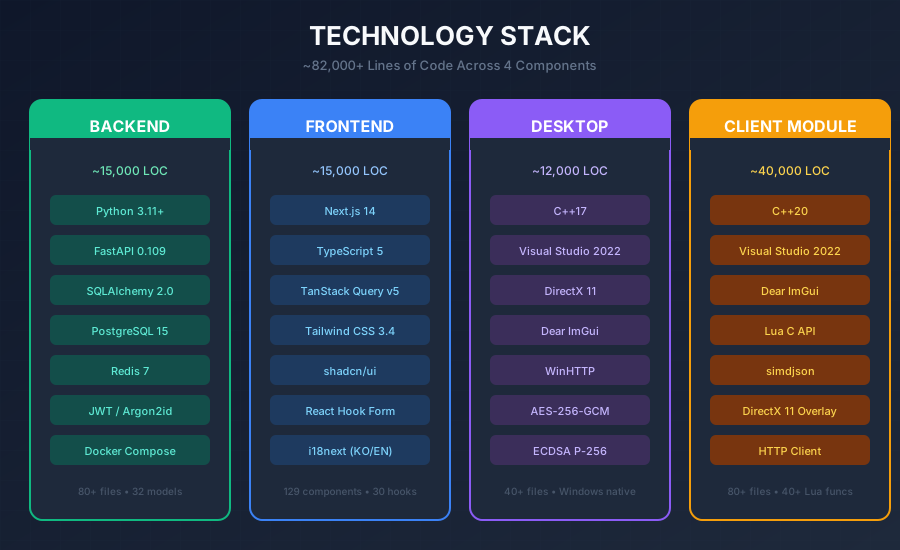
Why These Technologies?
Backend: Python + FastAPI
Why: FastAPI's async-first design handles concurrent API requests efficiently. Type hints with Pydantic provide automatic validation and documentation. SQLAlchemy 2.0's async support ensures non-blocking database operations.
Frontend: Next.js 14 + TypeScript
Why: App Router enables server components for optimal performance. TypeScript catches errors at compile time. TanStack Query handles server state with automatic caching and refetching.
Desktop: C++17 with DirectX/ImGui
Why: Native performance for cryptographic operations. Direct hardware access for HWID generation. ImGui provides immediate-mode rendering with minimal overhead.
Infrastructure: PostgreSQL + Redis + Docker
Why: PostgreSQL handles complex queries and ACID transactions. Redis provides sub-millisecond caching and session storage. Docker ensures consistent deployment across environments.